



Safe Environment Training
The Diocese of Phoenix requires all clergy, consecrated religious, deacons, lay employees, and volunteers to complete an annual Safe Environment Training. Please continue reading for instructions on completing your training:
FAQs
Read the Policy & Procedures for the Protection of Minors document below:
What is Safe Environment?
Safe Environment is the direct result of the “Charter for the Protection of Children and Young People” by the Bishops of the United States. The programs implemented by the diocese in the United States help to educate clergy, consecrated religious, staff, and all volunteers (including minors and vulnerable adults) on the signs of an individual experiencing abuse (sexual or physical) and neglect. It also intends to teach the signs of grooming, predation, and who is at risk of becoming a victim of grooming or the victim of a predator.
But my ministry is only adults. Why would we need to take Safe Environment?
Great question! Safe Environment Training is a mandatory training in order to protect children and vulnerable adults. A vulnerable adult is classified as a person who has a disability, has an illness, has developmental delays, or is elderly and relies on other adults to support them with procuring groceries, medicine, going to doctor’s appointments, or paying their bills. Vulnerable adults can be your friends, neighbors, or another person in your ministry. People aged 65 and older make up 18% of the population in the state of Arizona; reports of elder and vulnerable adult abuse have risen 150% in the last decade and continue to trend upward. It is part of our mission to help you gain the skills to report when something seems amiss, in order to help protect the dignity of every human person.
Completing Your Renewal
This is for those who have already completed Safe Environment Training in the Diocese of Phoenix and need to complete their annual renewal. If you have never completed the training in the Diocese of Phoenix or it as been more than one year since your renewal, please scroll to the section titled Completing Foundations Training.
This is for those who have already completed Safe Environment Training in the Diocese of Phoenix and need to complete their annual renewal. If you have never completed the training in the Diocese of Phoenix or it as been more than one year since your renewal, please scroll to the section titled Completing Foundations Training.
Please follow these instructions for completing your 2026-2027 Renewal:
- go to https://phoenix.cmgconnect.org/users/sign_in
- in the box that says Username, enter your username
- in the box that says password, enter your password
- you will be directed to your trainings dashboard
- find the training titled Safe Environment Training for LAY PERSONS ONLINE RENEWAL 2025-2026 SET year
- click the green start button
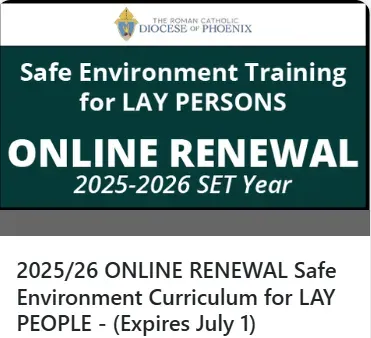
Following the completion of your training, please double check the expiration date on your background check. If your background check expires any time after 7/1/2025 and any time before 6/30/2026, your background check must be renewed.
Renewing Your Background Check
Please follow these instructions for completing your criminal background check renewal:
- go to https://phoenix.cmgconnect.org/users/sign_in
- in the box that says Username, enter your username
- in the box that says password, enter your password
- you will be directed to your trainings dashboard
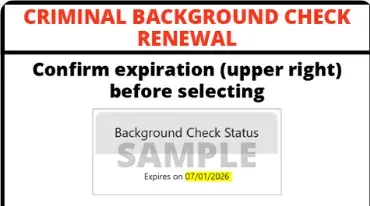
- find the training titled Criminal Background Check Renewal
- click the green start button
Completing Foundations Training
These instructions are for individuals who have never completed Safe Environment Training in the Diocese of Phoenix or it has been some time since you last completed the training and it is now expired.
Please follow these instructions for completing your Foundations training (For new users):
- go to https://phoenix.cmgconnect.org/users/sign_in
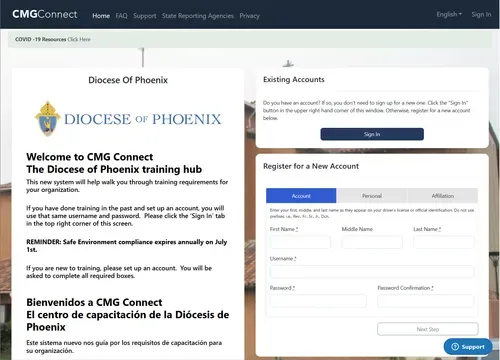
- you will be directed to a page that looks like this >
- Enter your information into the boxes on the bottom right, where it says register for a new account
- be sure to fill out all sections: account, personal, and affiliation
- click the green register button to create your account
- once your account has been made, log in using the username and password you created
- you will be directed to your trainings dashboard
- find the training titled Safe Environment for LAY PERSONS ONLINE FOUNDATION Safe haven - it’s up to you
- do not choose the Live training option - we are not offering in-person classes
- click the green start button
- the last step in the training is completing the background check. your training will be listed as 95% complete - this will resolve once your background check is returned to us.
If you have previously completed Safe Environment and need to re-take the Foundations training due to a lapse in your training, simply log in to your profile using your login information. If you need assistance accessing your profile, please contact the office.
